Revolutionize Your Communication with 3CX IP PBX
Upgrade your legacy PBX systems to the cloud-based 3CX IP PBX Communication solution and experience seamless, efficient, and cost-effective communication.
3CX IP PBX
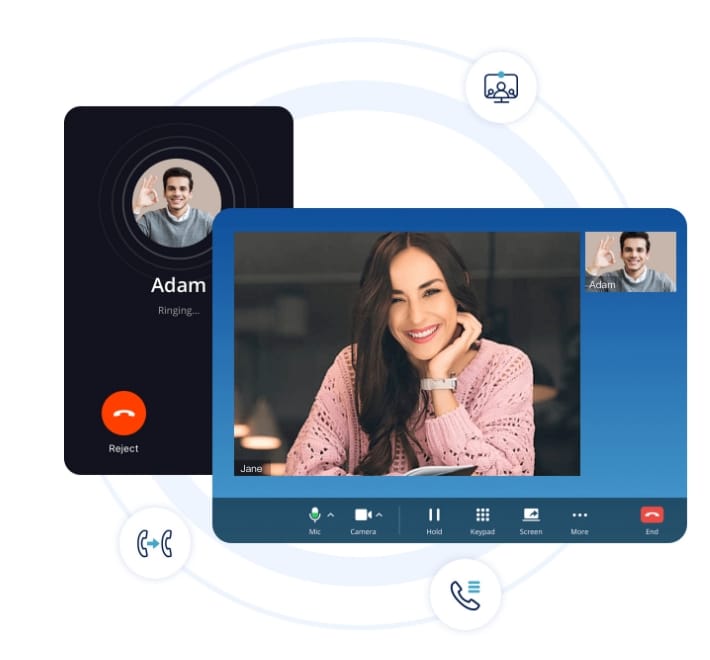
Revolutionize your Customer Interaction
3CX IP PBX is a robust solution that optimizes communication, enhances productivity, and ensures outstanding customer experiences.
3CX IP PBX Features:
Streamlining Customer Service and Boosting Efficiency
Enhance both internal and external communication effortlessly. In the dynamic world of business, effective communication and exceptional customer service are paramount. Let’s delve into the key features of 3CX Call Center and explore how they can benefit your organization.
Advanced Call Queue Strategies
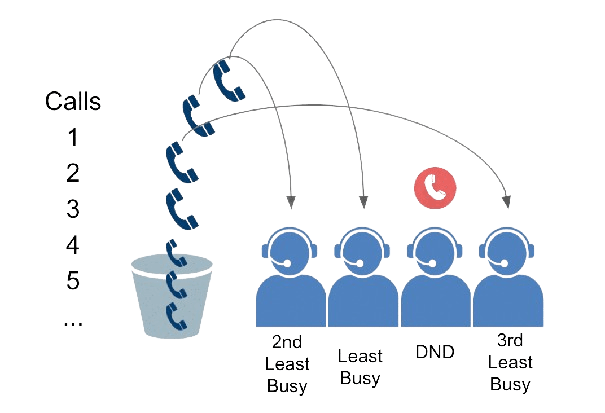
3CX Call Center offers powerful call queue management. Whether you’re dealing with high call volumes or need to prioritize specific queues, the system allows you to configure strategies tailored to your business requirements. From round-robin distribution to skills-based routing, you’re in control.
3CX IP PBX
The Best in Class Feature Set
Never Miss a Call
Advanced call queue strategies, agent dashboard and SLA assures agents and managers no customer calls are missed… ever!
No per agent pricing
Forget per agent per month pricing. Let anybody in your company help answer customer calls, without breaking the bank.
Easy Administration
Easily administer queue and agent configuration. Manage the system yourself – on premise or in the cloud
Video Conferencing
Meet smarter with 3CX Meet. No apps, downloads or details. Easily create, host, or join a meeting. It’s free! Why pay extra for Zoom?
Live Chat and Messaging
Not just calls. Use the integrated live chat, SMS Texting and WhatsApp solution too. No extra cost or admin.
Whatsapp for Agents
Stop answering for your whole business from your personal mobile. Let your team help you out with one shared WhatsApp business number.
Remote Team Working
Have your team work from anywhere and answer calls, live chat, text – and of course WhatsApp – using the 3CX apps for iOS, Android and Windows.
Mobility
3CX is built for mobility. Keep your team connected and productive even when working remotely. The team can answer calls, live chat and text
Respond to Facebook messages
With 3CX you can deliver Facebook messages immediately to the web client and smartphone apps.
Agent Dashboard and SLA Assurance
Agents and managers can breathe easy with 3CX. The agent dashboard provides real-time insights into call queues, agent availability, and performance metrics. Service Level Agreement (SLA) settings ensure that no customer call goes unanswered, enhancing overall satisfaction.


Live Chat and Messaging Integration
Why juggle separate solutions? 3CX seamlessly supports WhatsApp, Live Chat, and SMS within the same platform. Engage with customers effortlessly, whether they prefer chat or traditional calls. It’s an all-in-one communications system that saves costs and simplifies operations.
Call Recording and Compliance
Legal and quality monitoring are essential. 3CX allows call recording for compliance purposes. Train agents live with listen-in and whisper options, ensuring consistent service quality.

Why Choose 3CX Call Center?
Manage Your Own Call Center: Retain control of your data and save costs. No per-agent pricing—just an annual license fee.
Large Install Base: Trusted by global brands like Toyota, AirFrance, and BMW, 3CX delivers advanced contact center features.
Efficient Customer Service: Know who’s calling, streamline workflows, and enhance agent productivity.




Unlock Instant Insights with 3CX AI
Move beyond basic logging. 3CX now uses AI to analyze customer satisfaction and agent performance in real-time.
AI Sentiment Analysis
Automatically monitor the "mood" of every call. Identify frustrated customers or top-performing agents instantly.
Auto-Call Summaries
Save hours of listening time. 3CX generates concise text summaries of every conversation automatically.
Advanced Wallboards
Visualize success. Combine sentiment scores, wait times, and call volumes into a single, real-time dashboard.
Work From Anywhere: The Modern Office
From the car to the custom workflow, 3CX adapts to your environment.
CarPlay & Android Auto
Stay connected safely. Make calls, listen to voicemails, and view history directly from your car's dashboard.
Call Flow Designer (CFD)
Automate complex tasks. Create flows for Credit Card auth or Text-to-Speech without writing code.
Global IP Blocklist
Enterprise protection. 3CX automatically updates its global database to block known hacker IPs instantly.
Built-in Enterprise Security
Secure your communications with features rated "A+" by industry standards.
Auto SSL Management
Certificates renewed auto.
Encrypted Traffic
SRTP voice & HTTPS traffic.
SIP Attack Defense
Blocks SIP threats real-time.
Auto Failover
Keeps services running.
3CX Technology Case Studies
See how technology companies around the world are using 3CX to streamline communication, reduce costs, and improve customer support.
View Success Stories →3CX PBX Solution FAQs
Explore the most common questions about our 3CX PBX solution and discover how it can enhance your business communication.
How do I pass the 3CX Firewall Checker?
What is a 3CX SBC and when do I need it?
How to provision an IP Phone using PnP (Plug and Play)?
How to configure the 3CX Mobile App via QR Code?
How does 3CX Simultaneous Call licensing work?
How to configure a SIP Trunk in 3CX?
Where are 3CX call recordings stored?
Can I install 3CX on Google Cloud, Azure, or AWS?
How do I renew or upgrade my 3CX License Key?
Why Choose 3CX IP PBX Over Legacy Systems?

3CX IP PBX Solution
3CX IP PBX offers a robust, flexible, and scalable communication platform that integrates seamlessly with your existing infrastructure.
Cloud-Based Flexibility
Cost Efficiency
Unified Communications
Easy Management

Legacy PBX Systems
Legacy PBX systems are often rigid, expensive to maintain, and lack the advanced features required for modern business communication.
On-Premise Limitations
High Maintenance Costs
Limited Features
Complex Management
Upgrade to 3CX Cloud Communication
Transform your outdated PBX systems with TekkPak Technologies’ 3CX Cloud Communication solution. Experience unparalleled flexibility, scalability, and cost savings. Make the switch today and future-proof your business communications.
Address
C-402, 4th Floor, City Towers, Main Boulevard, Gulberg, Lahore, Pakistan
Ready To Get Started?